
Reduce your power consumption in your Homelab: Spindown Idle Disks
My Proxmox server is an older Ivy Bridge based Xeon E3-1225-v2 with 32 GB ECC RAM and four 3 TB harddisks as main storage and three smaller SSDs for various services. In the true sense of hyper-convergence this small server provides computing and storage resources. It uses about 65W when idle, which amounts to roughly 15€ in monthly energy costs.
Roundabout 25-30W come from the four harddisks being constantly on. But truth be told, the NAS services are actually only used one or two times a day.ä for watching movies or shows. For 20 hrs the disks are idling away. Spinning them down saves 1/3rd of the energy costs.
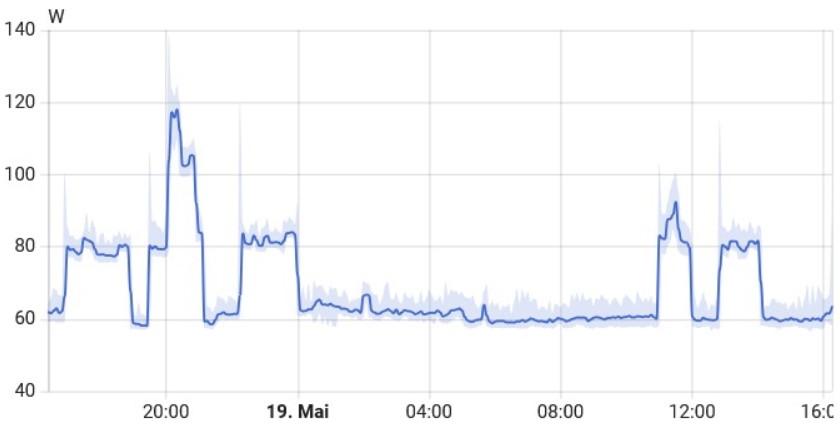
Many people are concerned about stressing their disks with spinning down and up a few times a day. My experience is that this is not a problem unless you spin them up a few times per hour. I have been spinning down disks since 2014 and never lost a disk. My latest array has been running for three years now. Even if I would loose a disk eventually, the saved money is more than enough to buy a new disk. My RAID array can handle loosing a disk. In my opinion common sense is much more important - for disks this means to mix vendors and use disks from different manufacturing dates. Buying all identical disks at once from the same shop puts you at much higher risks for multiple disk failures which cannot be handled by RAID levels.
In Proxmox/Debian it is very easy to spin down idle disks. I use the hd-idle package:
sudo apt install hd-idle
systemctl enable --now hd-idle
The configuration file needs updating to configure the correct disks for spindown:
nano /etc/default/hd-idle
At the bottom of the file you can find the options string. Below example shows the options to spindown two disks after 1200s of idle time. This works well for me, you might be happier with longer or shorter idle periods.
HD_IDLE_OPTS="-a disk/by-label/wwn-0x50014ee25ca35250 -i 1200 \\
              -a disk/by-label/wwn-0x50014ee2b1f6a196 -i 1200 \\
              -l /var/log/hd-idle.log"
You start the hd-idle service with systemd:
sudo systemctl enable —now hd-idle.service
The current status of disks can be checked with hdparm:
hdparm -C /dev/disk/by-id/wwn-0x5000039fe6f3c34e
Its best to use disk identifiers /dev/disks/by-id instead of
/dev/sdX. Disk identifiers never change even when add or remove
disks from your server.